
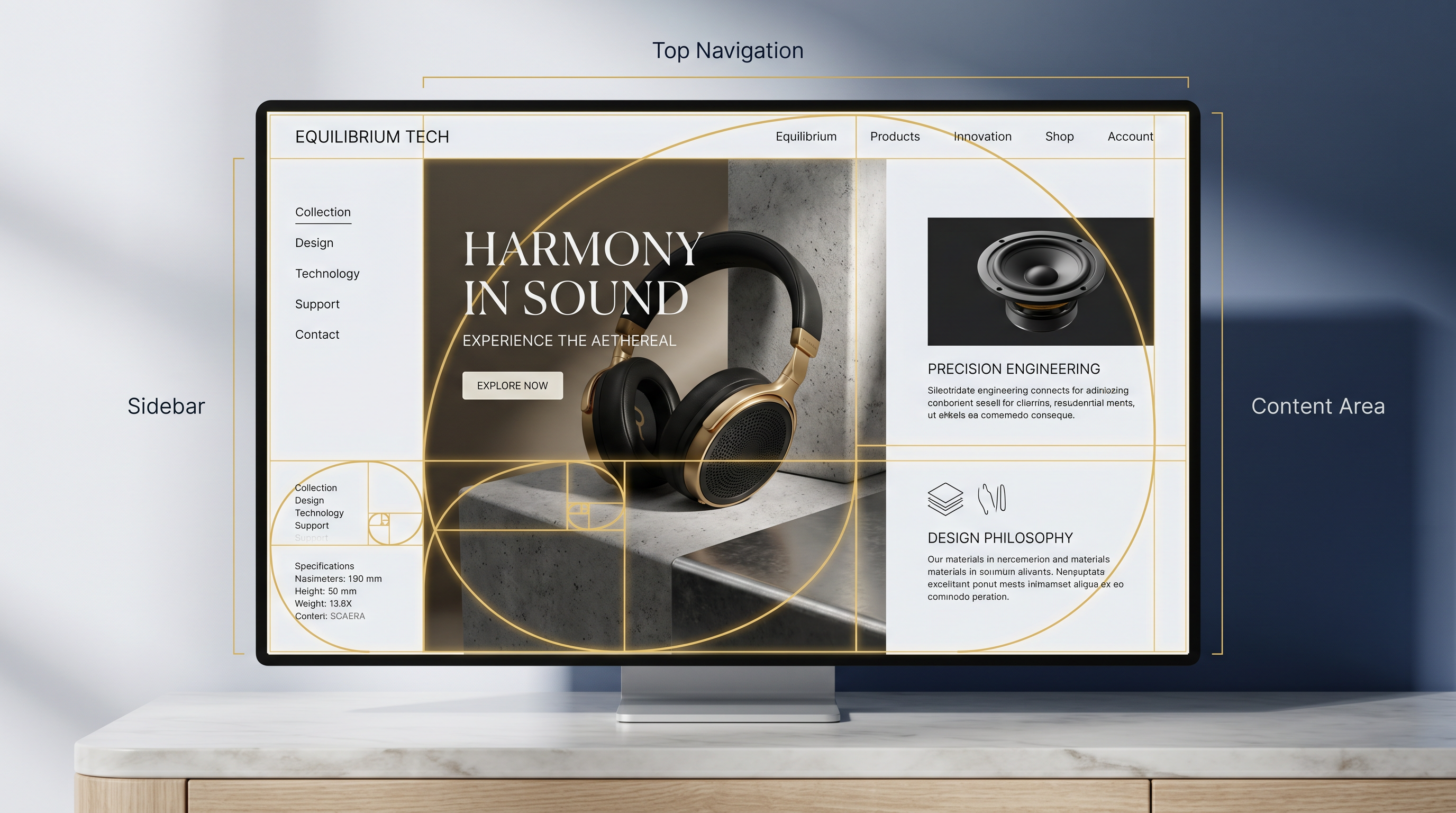
Golden Ratio in Web Design: Mastering Divine Proportions for Grids, Typography & UI Perfection
Imagine scrolling through a website where every element whispers balance, where grids align like ancient architecture, and typography flows with effortless grace. This isn't serendipity—it's the golden ratio in web design, the Divine Proportion that has captivated artists, architects, and now, digital creators for millennia. Derived from the irrational number phi (φ ≈ 1.618), this mathematical harmony divides spaces into parts where the whole relates to the larger as the larger to the smaller. In a digital world cluttered with asymmetry, harnessing phi web design elevates layouts from functional to unforgettable.
Why does it matter? Our eyes crave order. Studies in visual perception show that proportions mirroring nature—think nautilus shells or human anatomy—create subconscious comfort, boosting engagement and retention. For web designers, UX/UI specialists, and digital artists, the golden ratio grid, golden ratio typography, and divine proportion UI design aren't luxuries; they're precision tools for crafting interfaces that feel intuitively right.
Unlocking the Golden Ratio: The Divine Proportion Defined
At its core, the golden ratio emerges from the Fibonacci sequence, where each number is the sum of the two preceding ones: 0, 1, 1, 2, 3, 5, 8, 13, 21, 34, 55, 89, 144... As ratios approach φ (1.6180339887), they approximate perfection. Visually, draw a line segment divided so the ratio of the whole to the larger segment equals the larger to the smaller— that's your golden section.
The Math Behind Mathematical Harmony
Simple formula: φ = (1 + √5) / 2. To apply it, multiply any base dimension by 0.618 (the golden section) for the primary area, leaving 0.382 (1 - 0.618) for secondary. For a 1024px container—a common viewport width in legacy designs—main content spans 1024 × 0.618 ≈ 633px, sidebar or aside fills 1024 × 0.382 ≈ 391px. Scale up: a 1440px hero section? Primary visual: 890px, accent: 550px. This web layout proportions magic scales infinitely, from mobile (375px → 232px primary) to desktop.
Nature echoes it everywhere: galaxy spirals, pinecones, even your finger bones. Leonardo da Vinci sketched it in the Vitruvian Man. In web design, it's your shortcut to layouts that resonate on a primal level.
Golden Ratio Grid: Building Balanced Web Layouts
Forget rigid 12-column grids; the golden ratio grid introduces organic flow. Start with your canvas width, apply phi recursively for nested divisions. Picture a dashboard: outer container 1200px → hero 742px (1200×0.618), content well 458px. Within the hero, subdivide: headline 458px, subtext 284px. It's fractal elegance—each layer self-similar, breathing life into sterile screens.
Practical Steps for Phi Web Design Grids
- Measure your breakpoint width (e.g., 1440px desktop).
- Calculate primary column: width × 0.618.
- Gutter and margins: 0.382 remainder, split goldenly.
- Recursive nesting: Apply to cards, modals, navbars.
- Test responsively—phi holds across scales.
In CSS, leverage it with custom properties: --phi: 1.618; --primary: calc(100vw * 0.618);. Frameworks like Tailwind? Extend with plugins. The result? Sites where users linger, converting intuition to interaction.
In the dance of pixels, the golden ratio grid turns chaos into symphony—each element in perfect, proportional repose.
Golden Ratio Typography: Scaling Text with Divine Precision
Typography without proportion is noise. Golden ratio typography scales font sizes by phi multipliers, creating hierarchies that guide the eye like a Renaissance canvas. Base size 16px? H1: 16 × φ^3 ≈ 42px; H2: 16 × φ^2 ≈ 26px; body: 16px; captions: 16 / φ ≈ 10px.
Line Height and Measures in Harmony
Optimal line length? 40-75 characters, goldenly 52 (fibonacci nod). Line height: base × 1.618 for airy rhythm. Example stack:
- H1: 3rem (48px), lh: 4.854rem
- H2: 1.854rem (29.664px), lh: 3rem
- P: 1rem (16px), lh: 1.618rem
For a blog sidebar (391px from our 1024px split), measure caps text at 24 characters—phi-perfect readability. Tools like GetRatioGolden calculator streamline this: input base, get full cascades instantly. It's not guesswork; it's engineered elegance.
Divine Proportion in UI Design: Buttons, Cards, and Beyond
Extend to micro-interactions. Divine proportion UI design sizes buttons: primary width 100px → padding 62px height slice. Cards? 300px container → image 185px, content 115px. Spacing: margins × 0.618 for breathing room that feels vast yet intimate.
Real-World Applications and Examples
E-commerce product grids: tile 280px → image 173px, details 107px. Navigation: logo 200px, menu spans 328px (total 528px hero slice). Modals pop with phi-centered content blocks. Even icons: stroke widths scale 1:1.618 for depth. Digital artists revel here—SVG paths curved to phi arcs yield hypnotic loaders.
Pro tip: Pair with color ratios. Dominant hue spans 0.618 canvas, accents 0.382—vibrancy without overwhelm.
Tools and Techniques: GetRatioGolden and Beyond
Manual math slows workflows. Enter the GetRatioGolden calculator, your go-to for instant phi computations. Punch in 1920px viewport: output grids, type scales, spacings—exportable to Figma, Sketch, or CSS. Browser extensions visualize ratios live; plugins for Webflow automate grids.
Advanced Tips for Mastery
- Combine with modular scales (e.g., 1.25 base, phi-tuned).
- Audit existing sites: overlay golden spirals via dev tools.
- Accessibility first: ensure phi doesn't compromise contrast or focus.
- Iterate with A/B: phi often wins dwell time metrics.
Common Pitfalls and Pro Best Practices
Overdo it, and rigidity creeps in—phi complements, doesn't dictate. Responsive breakpoints demand recalibration; clamp ratios with min/max. Test on real devices: what sings on desktop hums on mobile if unadapted.
Best practices: Prototype in Figma with golden overlays. Use CSS Grid's fr units approximated to phi (e.g., 8fr / 5fr ≈1.618). Document your system—teams thrive on shared harmony.
The Timeless Allure of Phi in Modern Web Design
From ancient Parthenon to Apple's product photography, the Divine Proportion endures because it mirrors our world. In web design, it transforms pixels into poetry—grids that guide, type that tempts, UIs that enchant. Next project, summon phi. Calculate with GetRatioGolden, build with intention, and watch your creations achieve mathematical harmony.
The universe unfolds in golden spirals. Your websites can too. Dive in, proportion boldly, and design not just sites, but experiences that linger like a perfect equation in the mind.
